How Computers Work: Explained from First Principles
If you are following my blog, you might know that my plan for this year is to learn and program low-level systems. I wanted to develop an operating system since I was in college. I never got enough time back then. But now I have plenty of time to work on skills other than my job.
I spent last month learning about how a computer is basically made and how a CPU performed all these magical tasks from the absolute beginning.
The main resource I used to learn this was Nand2Tetris. In this post I will explain how a computer works without going into the same level of detail as the course. I will focus on the concepts you need to understand the basic flow.
Important: I am neither an expert in low-level systems nor a computer science veteran. This post is written for software engineers who want to understand computers from first principles, and it intentionally keeps the details simple.
Bits — Representing 0 and 1
A bit is a binary value that can represent either 0 or 1. A computer ultimately represents and manipulates information using bits, although software and hardware work with larger abstractions built from them.
How Do Computers Represent Bits?
There is a tiny semiconductor device known as a transistor which acts like a switch. If the switch is off, the value is considered 0, and if the switch is on, the value is considered 1. Modern CPUs consist of billions of transistors. For example, Apple’s M1 chip contains 16 billion transistors.
Manipulating Bits — Logic Gates
So in order to manipulate these bits, we need something called a logic gate. A logic gate is a fundamental electrical circuit that performs several operations on these bits. I really don’t know how these electrical circuits are made from an electrical engineering perspective because I am from computer science, and I really don’t even care.
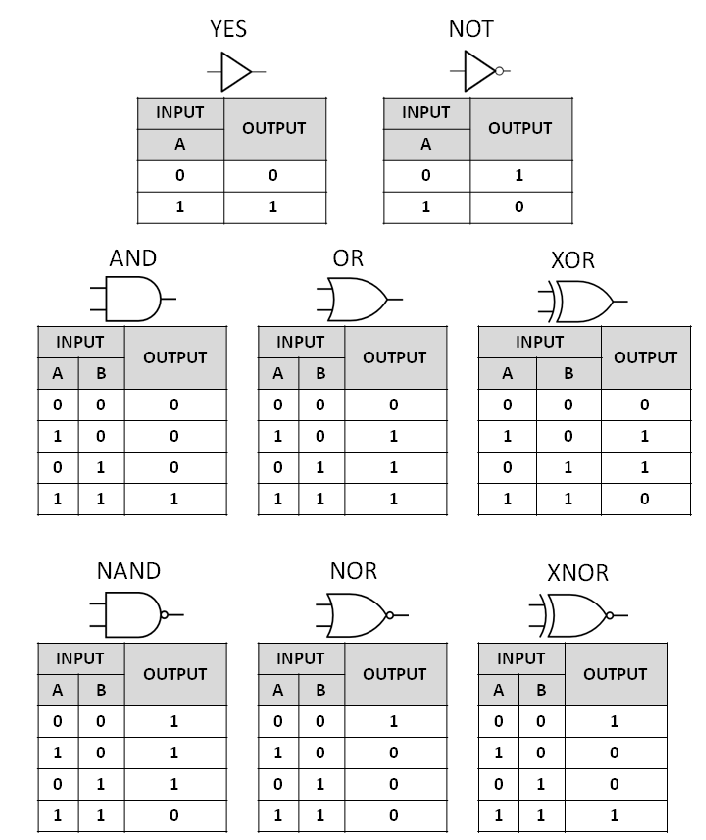
We have different types of gates, and here are a few of them that you should really care about.
- NOT — Reverses the bit value.
- AND — Outputs 1 if both inputs are 1; otherwise 0.
- OR — Outputs 1 if either input is 1; otherwise 0.
- XOR — Outputs 1 if the inputs differ; otherwise 0.
- NAND — The NOT of the AND operation.
NAND Is a Universal Gate
NAND is called a universal gate because it can be used to make all other gates. It really doesn’t matter if you know how to make all other gates by using NAND gates if you are not interested in low-level stuff. But you can always Google this topic, and it is not that hard to understand.
What About Conditional Manipulation?
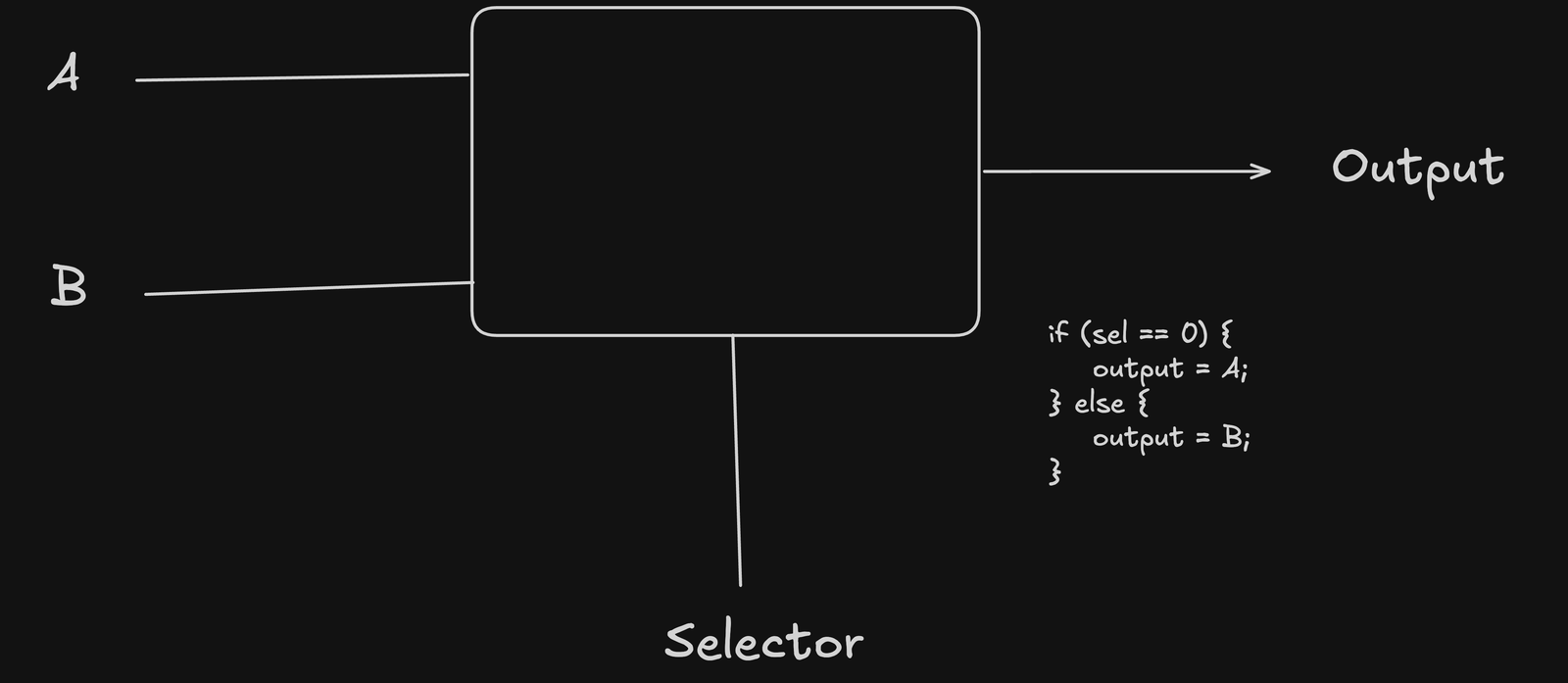
We can also perform conditional logic on bits using something called a multiplexer. But it does take two inputs and a third input known as a selector. If the selector is 0, the multiplexer outputs input A; otherwise, it outputs input B.
Counting Numbers
Now that we know how to represent and manipulate bits, we need a way to represent larger numbers. Humans commonly use base 10, while computers use binary (base 2). Start with the idea of place value:
476

But in computers we don’t have base 10 counting, so we invented binary counting, which is based on 2, not 10. This example will make it clearer. For example, the binary number 101 is equal to:
101

The number 5 is represented as 101 in binary. The same place-value idea lets us represent larger numbers.
Mathematical Operations
The next step is arithmetic: adding, subtracting, multiplying, and dividing the values represented by bits. CPUs implement these operations using execution units such as integer ALUs and, for some operations, floating-point or vector units.
Binary addition follows the same basic rules as decimal addition, but it uses only the digits 0 and 1. The only difference is that it involves only 0 and 1. All the addition is done by keeping the binary number system in mind.
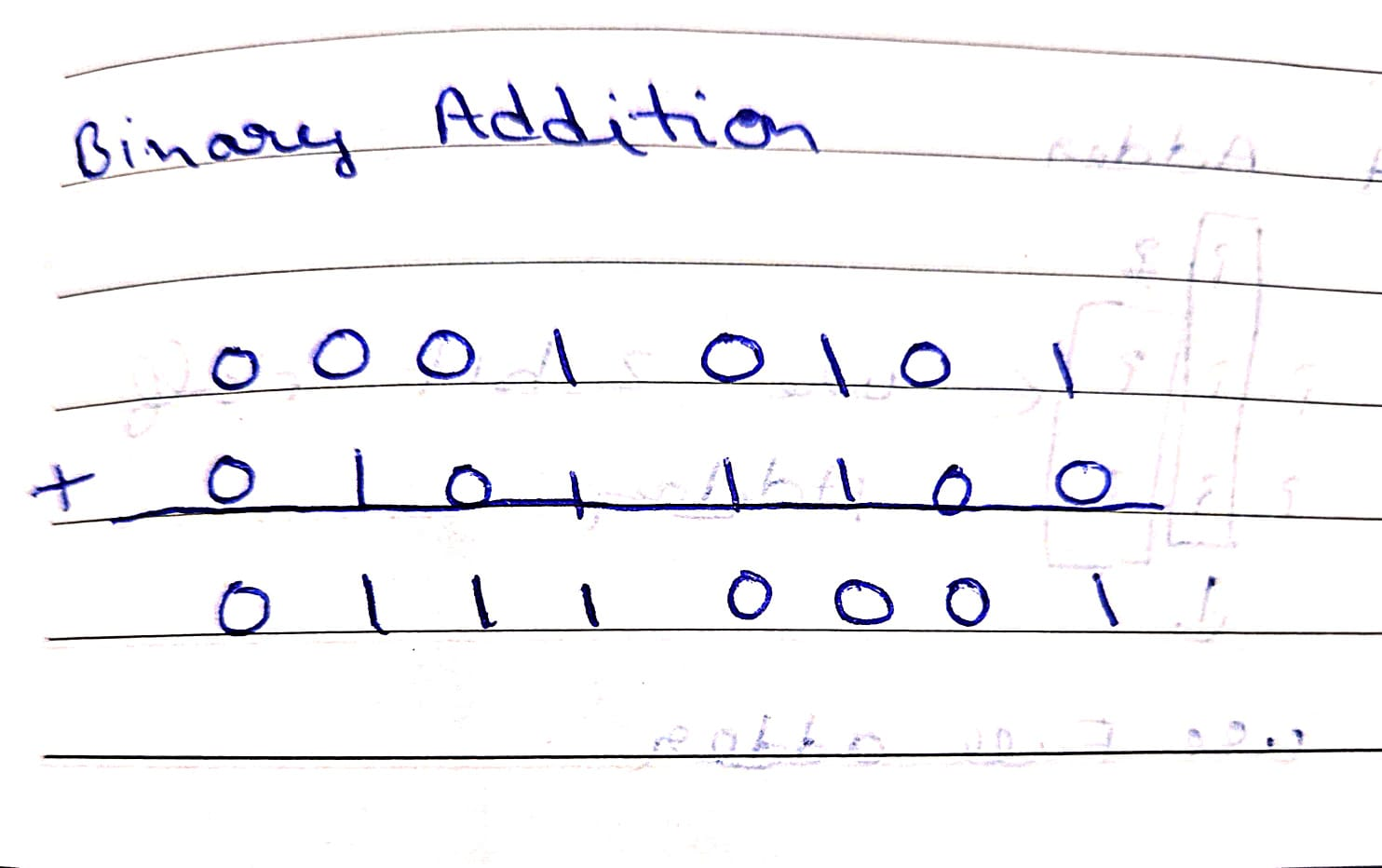
When we are adding 1 + 0, the output will be 1 because that’s what it is. But while adding 1 + 1, the output will be 10 because this is how we present the 2 in binary number system. You can check that in the image above. You have to perform simple addition but convert decimal numbers into binary numbers. Also, you can follow the concept of carry forward.
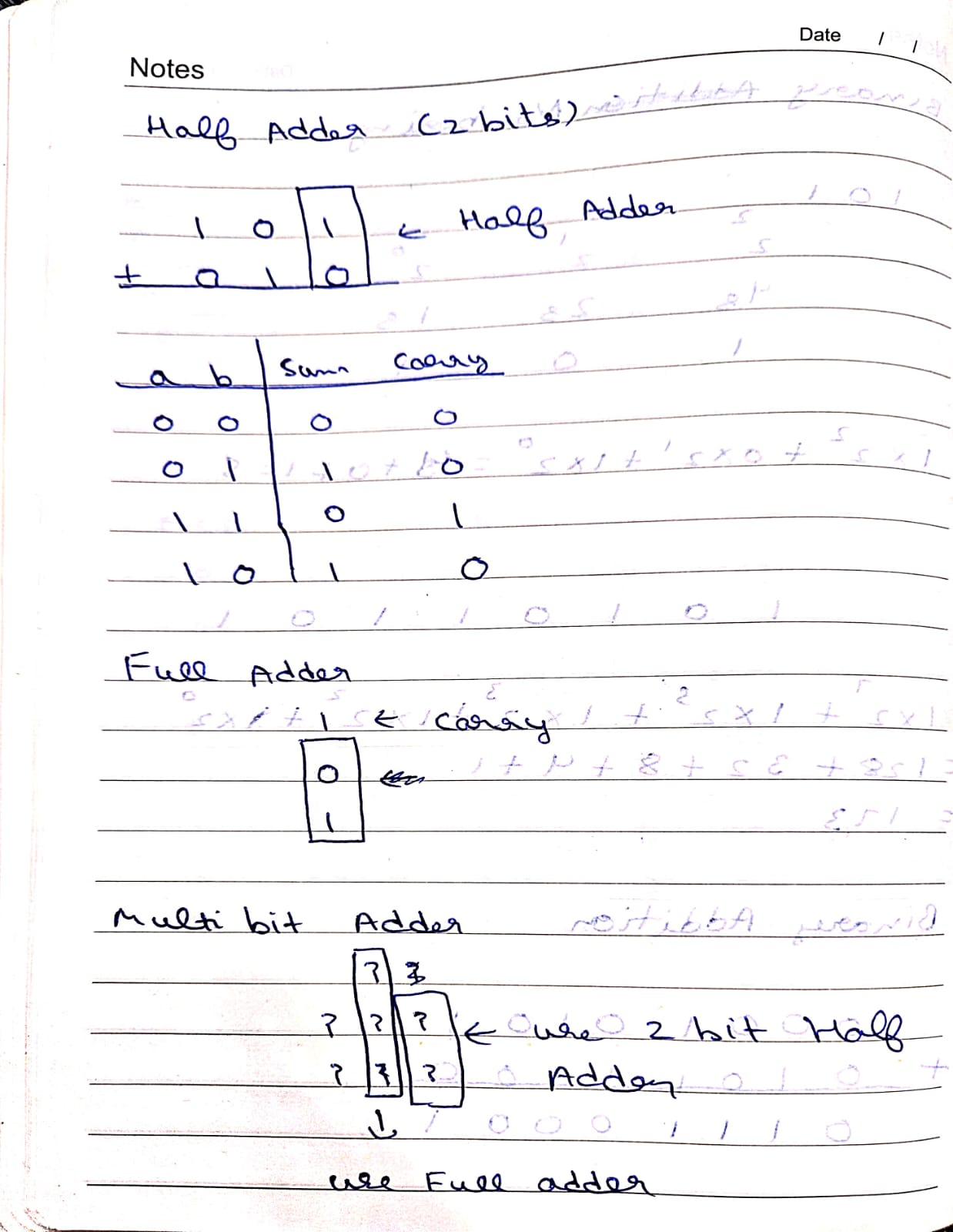
Only 0 or 1 can fit in one bit. So we sent the remaining number as carry. Below is another example to understand this deeply.
Limits of Binary Numbers
A fixed-width integer type can represent only a finite range of values. The range depends on the number of bits and whether the type is signed or unsigned. Many modern general-purpose CPUs are 64-bit, but that does not mean every operation is limited to 64 bits; CPUs can also process smaller values and wider vector data.
This leads to the question: what is the maximum value that can be represented with different numbers of bits?
 11 bit → 0 to 1
 2
 32 bits → 0 to 3
 4
 53 bits → 0 to 7
 6
 74 bits → 0 to 15
 8
 95 bits → 0 to 31
10
116 bits → 0 to 63
12
137 bits → 0 to 127
14
158 bits → 0 to 255
16
1716 bits → 0 to 65,535
18
1932 bits → 0 to 4,294,967,295
20
21For an unsigned 64-bit integer: `0` to `18,446,744,073,709,551,615`.
Negative Numbers
Computers also need to represent negative numbers, but I will not discuss those in this post, as it is a little bit complex and I just don’t want to lose your attention. Although I am sharing this video link, which you can use to learn more about representing negative numbers.
Arithmetic Logic Unit
Now we have some building blocks that we can use to make an ALU. A CPU consists of several parts, and ALU is one of them. It is one part of the CPU responsible for many integer arithmetic and logical operations. Modern CPUs also contain specialized execution units for tasks such as floating-point and vector operations.
If I talk about designing an ALU, then you will need to combine the chips that we discussed earlier in order to make it capable of performing mathematical and logical operations.
Remembering Things
As of now we are just giving some input to our computer, and it is giving us some output, but that is not enough. We need our computer to remember things. Just like in programming, you declare a variable, and your computer remembers that variable, and whenever you want to use the value, you can ask a computer for the value. This is where your registers come into play.
Registers
Registers are small, very fast storage locations inside the CPU. They hold values that execution units need immediately, such as operands, addresses, and intermediate results.
Storage Devices
A computer needs several kinds of storage and memory. RAM provides fast, volatile working memory, while SSDs and HDDs provide persistent storage.
RAM
- Operands for instructions
- Instruction pointer, stack pointer
- Temporary results during execution
You might have heard that applications are “loaded into RAM.” This means the operating system keeps the portions of program code and data needed for execution in memory. Not every byte has to be resident at once, and the contents of RAM are generally lost when the machine loses power.
HDD & SSD
- Persistent Data
If you need to store data that should survive a restart, then you store it on persistent storage such as an SSD or HDD. The reason RAM can’t store data permanently is because it is fast but temporary, and the reason HDD and SSD can store data permanently is because they are slow but persistent.
How Does the CPU Operate on RAM?
Think of RAM as a very long array which can be used to store and retrieve data. Every cell in RAM can store data and is represented by a unique address.
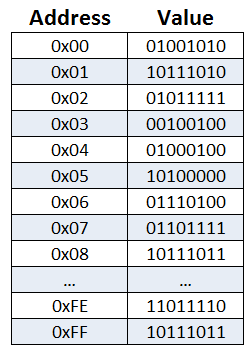
Conceptually, the CPU requests the value at a memory address or writes a value to a memory address. In practice, caches and the memory hierarchy sit between the CPU and main memory.
Fetch, Decode & Execute
When you write a program in a high-level language, it is eventually translated into machine instructions that the CPU can execute. At the hardware level, those instructions are encoded as bits. CPUs execute instructions according to the rules of their instruction-set architecture.
Whenever a computer needs to do some operations, it will fetch data from memory to registers, execute the operation with the help of the ALU and save back the data to memory.
Fetch
The CPU needs an instruction to process.
- There is a special register called Program Counter (PC).
- PC holds a memory address. That address points to the next instruction.
Steps:
- CPU asks for next instruction data from RAM.
- RAM returns the instruction bits
- Instruction is loaded into the Instruction Register.
- The program counter is updated to the address of the next instruction or another target determined by the CPU architecture and the instruction being executed; it is not universally incremented by 1.
Decode
Now the CPU looks at the bits it just fetched from RAM.
Example instruction (simplified):
ADD R1, R2 // Adds 2 values
In reality, this is just 0 and 1:
1010100100010010
Decoding means:
Split the instruction into fields:
- Opcode → What operation? (ADD, LOAD, JUMP)
- Operands → Values on which operation need to be performed.
Execute
Now CPU will actually execute the instruction. Depending on the instruction, execution may involve:
Examples:
- Arithmetic Instruction: ALU adds two numbers and store result in a register.
- Memory Instruction: Calculate address and Read or Write from or into RAM.
- Jump Instruction: Just jump to a specific instruction.
That’s It
So this is how you can understand A computer performs operations in a very abstracted way. Of course there are several other things that I didn’t include in this post to keep it more friendly and easy to read. I will be sharing my progress on this newsletter, and if you want to follow along, you can follow me on Twitter.