How Database Actually Store Data on Disk
I’ve been exploring databases in depth for some time, and now I’m planning to share what I’ve learned through a series of blog posts. This is the first post in the series, where I’ll talk about how databases store data on disk. In later posts, I plan to dive into important topics like B+ Trees, database indexes, and LSM Trees.
Important: I’m not a database expert, so there may be mistakes or inaccuracies in my understanding. If you spot something that’s incorrect, I’d genuinely appreciate being corrected—I see this series as a way to deepen my understanding through writing and discussion.
Disk & RAM
A database uses both RAM and disk to store its data, but they are used in a completely unique way. RAM is used to store data that needs to be fetched quickly because RAM is faster than disk. On the other hand, a disk is used to store that type of data that needs to be persisted. Some databases, like Redis, use only RAM, but they have specific use cases and aren’t for everything.
For example, Postgres uses disk to store almost all of its data, including tables, indexing, WAL, system files, etc. But it also utilizes RAM to make the system faster by storing frequently queried data directly in RAM for faster access.
Random IO & Sequential IO
There are mainly 2 ways in which a computer can read and write data from a hard disk or solid-state drive. Random IO jumps to scattered locations across the storage device, while sequential IO reads and writes contiguous blocks of data in a straight line.
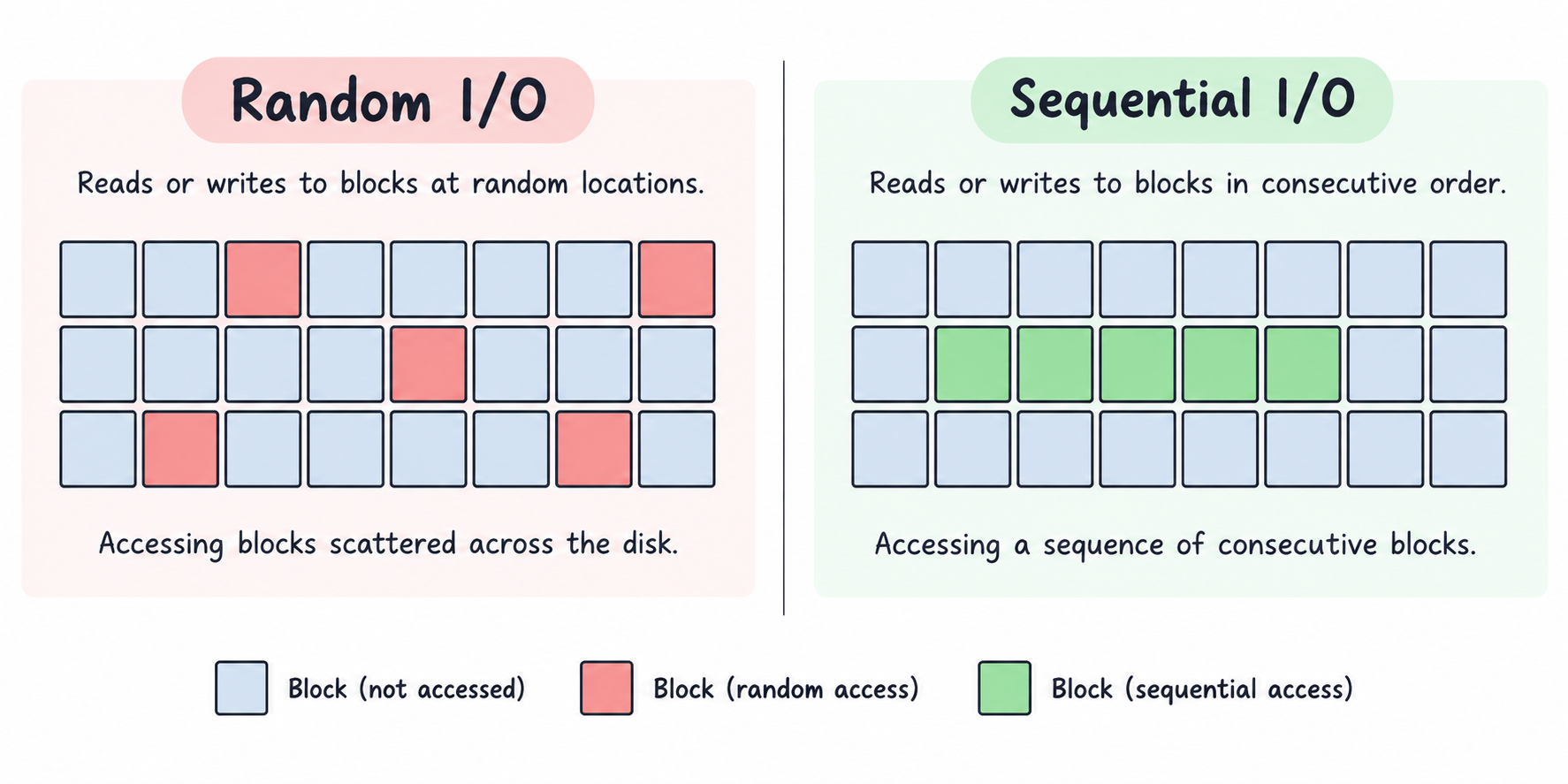
Performance-wise, sequential IO is better because storage devices are optimized for this. In sequential IO storage devices can prefetch data, and streaming is also very optimized. On the other hand, random IO is not that performant because now your disk needs to do more work to find a place for putting the data.
Why Random IO Is Expensive?
Seek Time
On HDDs, random IO requires the mechanical arm of the disk to move and the platters to spin to a correct location randomly while reading and writing data. Imagine you are reading a book, but all the chapters are not in linear order. You will spend time finding chapters instead of reading them.
No Prefetching
There is a core assumption that if the computer requested data from block 1, then it is highly possible that it will request data on block 2 as well. Think of downloading a file; all the contents of file is stored sequentially on the disk so that the computer can just stream the download instead of finding the next block of data.
Pages
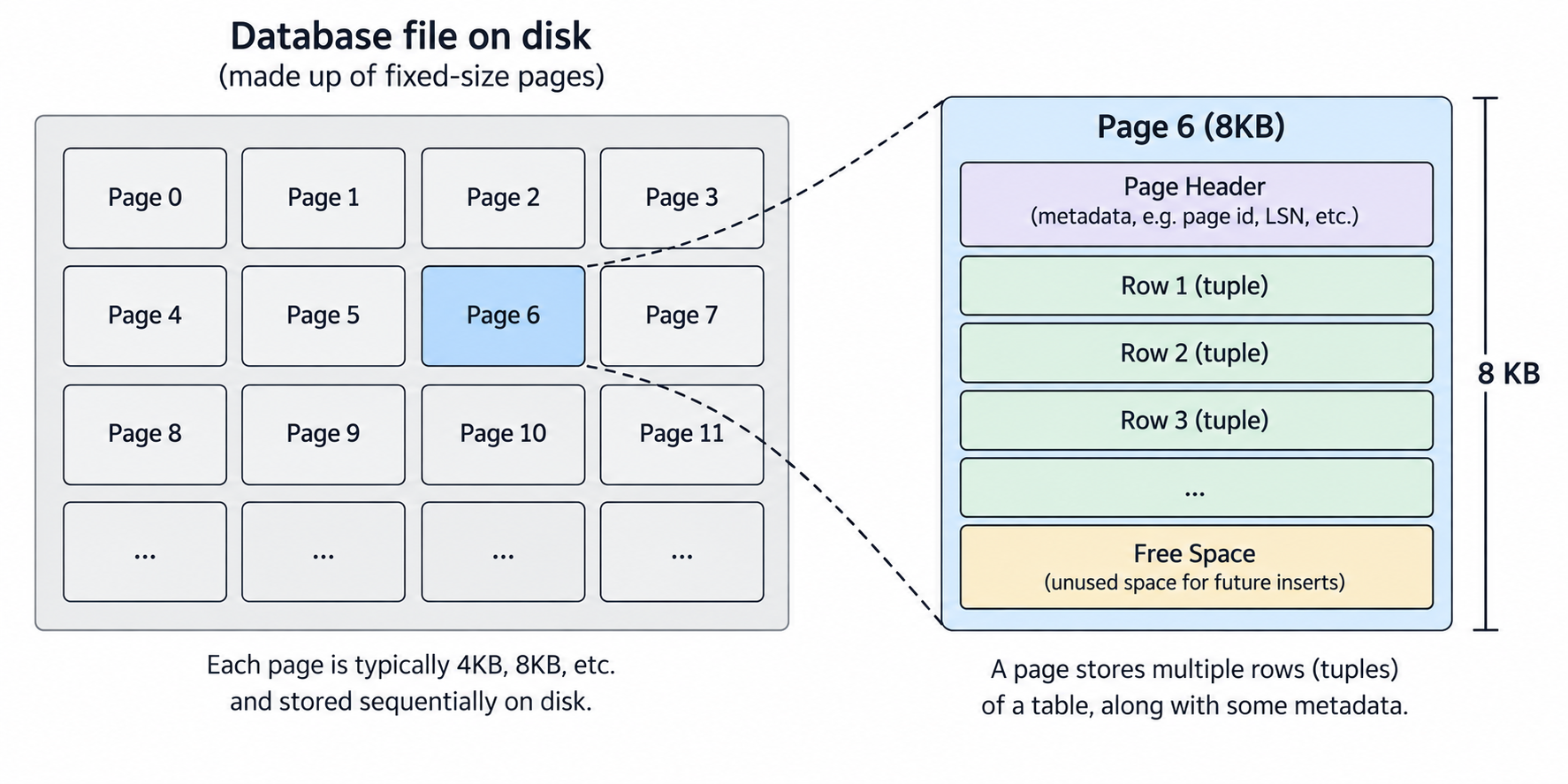
In databases a page is a basic unit of reading and writing data. A page is a fixed-size chunk of data that a database can read and write from disk at one time. Page size varies by database, for example. Postgres page size is 8K, while MySQL page size is 16KB (but it also supports 32KB and 64KB page sizes). Most of the time, page size ranges from 4 KB to 32 KB.
All the data, such as tables, rows, indexes, and metadata, is broken down and stored in pages. When reading data, the whole page is retrieved. A single page can also contain multiple rows.
But Why Pages?
Now you must be thinking about why databases are using pages to store data and why not just simply store the actual rows directly on disk without breaking into pages. There are very clear reasons for this.
Show Mercy On Disk
Let’s say a database is not using pages; instead, it is just writing individual bytes or rows to disk. It will be very inefficient and overwhelming for the disk. Let’s do some math. You are using a database without pages, and you want to write several rows to it. Each row size is around 256 bytes, and there are a total of 50 rows. In this case your database will do 50 write operations to disk. Same number of operations for reading data.
But let’s introduce pages. Your database is now using pages where page size is 8 KB. A single can now store 8196 (page size in bytes) / 256 (single row size in bytes) = 32 (ignoring page metadata). We want to store 50 rows, so we will need at least 2 pages. So a database will break your rows and fit them in 2 pages. This will result in only 2 disk write operations compared to 50 operations without pages.
Caching Is Easy
When a database needs to query and read a row, it will read the whole page and store it in RAM. As a single page may contain more than 1 row, we have already stored the neighbours of the row we are reading in RAM. If in the future we need to query neighbouring rows, we already have them in RAM and can be severed quickly without even querying the disc.
Better Memory Management
It is easy for a computer to allocate and deallocate fixed-size memory blocks. So it will become easy for the database to allocate memory whenever it is required. This also helps in tracking free space without handling unpredictable variable-sized memory blocks.
Better Indexing
A database uses BTree (we may talk about it in future posts) for indexing the data. As its name suggests, it is a tree-based structure in which pages are nodes to index data. Using fixed-size pages as nodes instead of random-size blocks makes B-tree indexing very efficient.
Indexing
A database index is data for faster access. I’m not going to discuss database indexes in detail in this post because this topic deserves its separate standalone post. Think of it like a table of contents for a book that you can use to directly jump to a specific chapter. A database also uses indexes for jumping to requested data without scanning everything. If you need a more technical overview of the BTree index, then the below image is a good starting point.
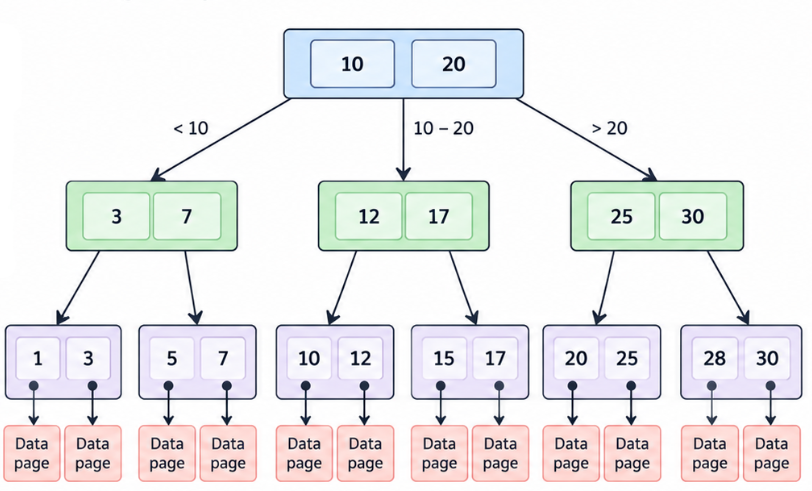
Without indexes, a database will do a full table scan, and with indexes, a database can jump to relevant pieces of data quickly.
Where Does Sequential IO & Random IO Fits In?
Let’s say you run the following query.
1SELECT * FROM users;
In this case a database may use sequential IO because it needs to fetch a complete table, and there is a very high possibility that this data would be stored in a contiguous block of data. But on the other hand, consider this query.
1SELECT * FROM users WHERE id = 12345;
As we are not querying a complete row but a single user, then it may be done using sequential IO. A database will first go to an indexing structure such as a B-tree, then the B-tree will do reads on disk, and those disks will be random reads. After that, BTree will tell the database which page contains the requested data, and the database will finally request that page.
Buffer Pool
Actually we already discussed this in a bullet point, but I just wanted to give it its own section. A database engine allocates a big chunk of memory (RAM). This chunk is used to optimize the speed of the database by storing the frequently requested pages in memory. When a read query is performed on the database, it will fetch the page associated with the request data. This page will then be stored in the buffer pool (RAM or memory) for quick retrieval in the future.
That’s It For Today
So this was an overview of how databases store data on disk. I hope you find this content informative. If there are any inaccuracies in this blog post or you want to give suggestions, please let me know through the comment sections, and let me and visitors of this blog benefit from your knowledge. I also run a newsletter that you can subscribe to for free and get all new posts directly in your inbox.