How Search Engines Find Your Website: Web Crawlers
This is the 2nd episode of my series Behind The Screen, where I explain how the technology behind everyday products works, in the simplest way I can.
Web crawlers are software that only a few people know about, but they play a major role in today’s tech. Without web crawlers, our search engines will not be able to show us search results. In this post we will discuss how web crawlers work by learning the core idea behind them.
I’m not tying this article to one specific crawler implementation. Different systems can make different design choices, so we will focus on the common building blocks rather than describing how any particular search engine crawls the entire internet.
What Is a Web Crawler?
A web crawler, sometimes called a bot or a spider, is software that automatically and systematically fetches web resources, follows links, and extracts information that can be used by a search engine or another indexing system.
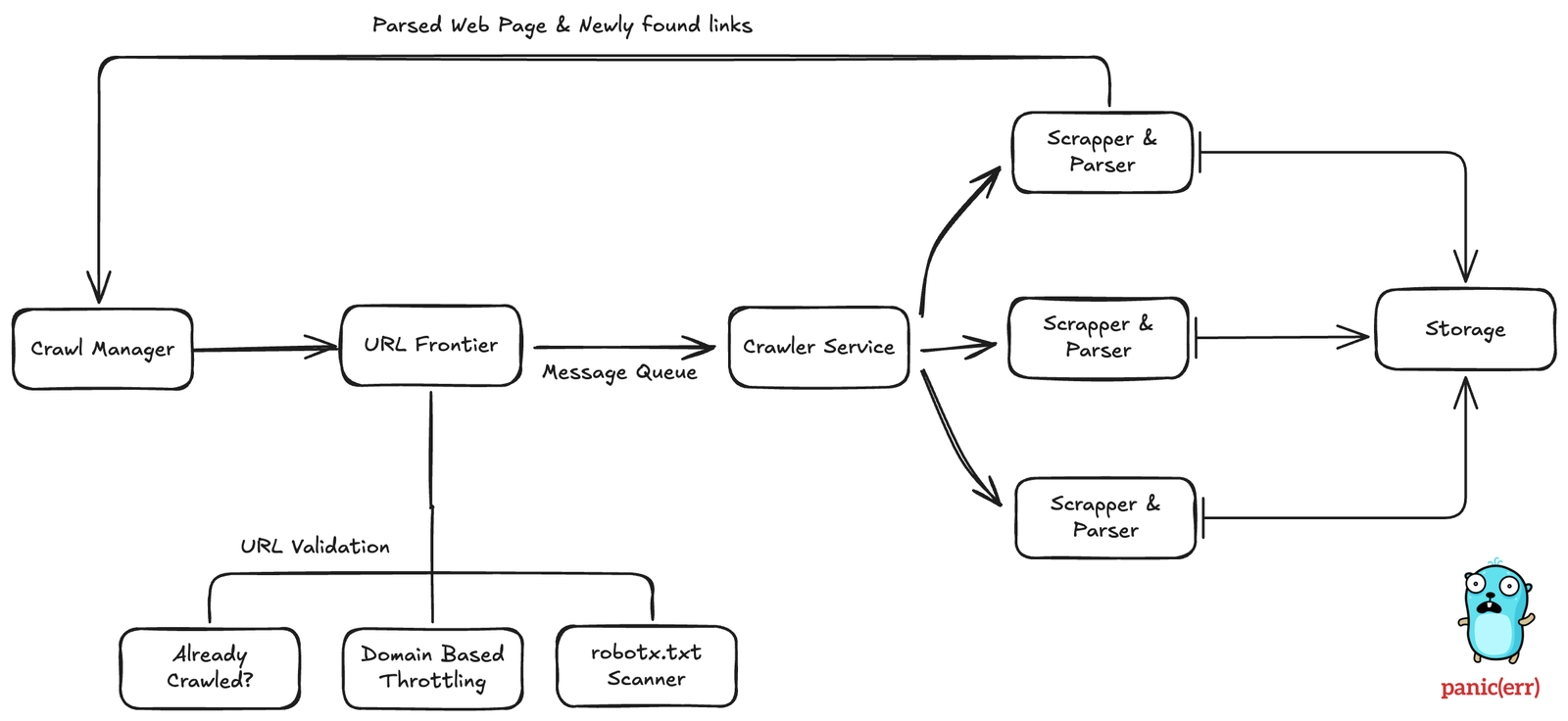
At a high level, a crawler needs to do several things:
- Verify the link before crawling.
- Download HTML for the page.
- Parse the HTML and extract meaningful information.
- Store this data in a storage system for later indexing and processing.
These things are handled by different components. Each one performs its task and sends the result to the next step. Let’s understand each component.
Crawl Manager
The Crawl Manager coordinates the overall crawling workflow. It can receive a URL to crawl and pass it to the URL Frontier, which decides when and how that URL should be scheduled.
URL Frontier
Before crawling a URL, we need to decide whether and when it should be processed. A URL Frontier can handle questions such as these:
- The URL is already processed.
- The URL is blacklisted by our crawler.
- We have rate-limited specific websites to prevent abuse.
- The website does not want us to process this URL via robots.txt.
A website can publish crawler instructions in a robots.txt file at the site root. Compliant crawlers can use those rules when deciding which paths to fetch.
For example, check this
 1https://sushantdhiman.substack.com/robots.txt
 2
 3User-agent: BLEXBot
 4Disallow: /
 5
 6User-agent: Twitterbot
 7Disallow:
 8
 9
10User-agent: *
11Disallow: /action/
12Disallow: /publish
13Disallow: /sign-in
14Disallow: /channel-frame
15Disallow: /session-attribution-frame
16Disallow: /visited-surface-frame
17Disallow: /feed/private
18Disallow: /feed/podcast/*/private/*.rss
19Disallow: /subscribe
20Disallow: /lovestack/*
21Disallow: /p/*/comment/*
22Disallow: /inbox/post/*
23Disallow: /notes/post/*
24Disallow: /embed
A crawler that follows the Robots Exclusion Protocol should treat matching Disallow rules as instructions not to fetch those paths. However, robots.txt is not an access-control or security mechanism; a malicious client can ignore it.
How Does a Crawler Check If a Link Was Already Crawled?
One possible technique for this is a Bloom filter, which is a space-efficient probabilistic data structure. A Bloom filter is useful when we want a compact probabilistic membership check. It can answer “definitely not present” or “possibly present,” but it can produce false positives. It is one possible technique for reducing expensive duplicate-URL checks; a production crawler can use several data structures and storage layers.
But Why This? Why Not a DB Query?
A membership check may happen extremely frequently, so a compact probabilistic structure can reduce expensive storage lookups. A production crawler would typically combine this with durable URL state and other deduplication mechanisms.
Crawling Actually Starts
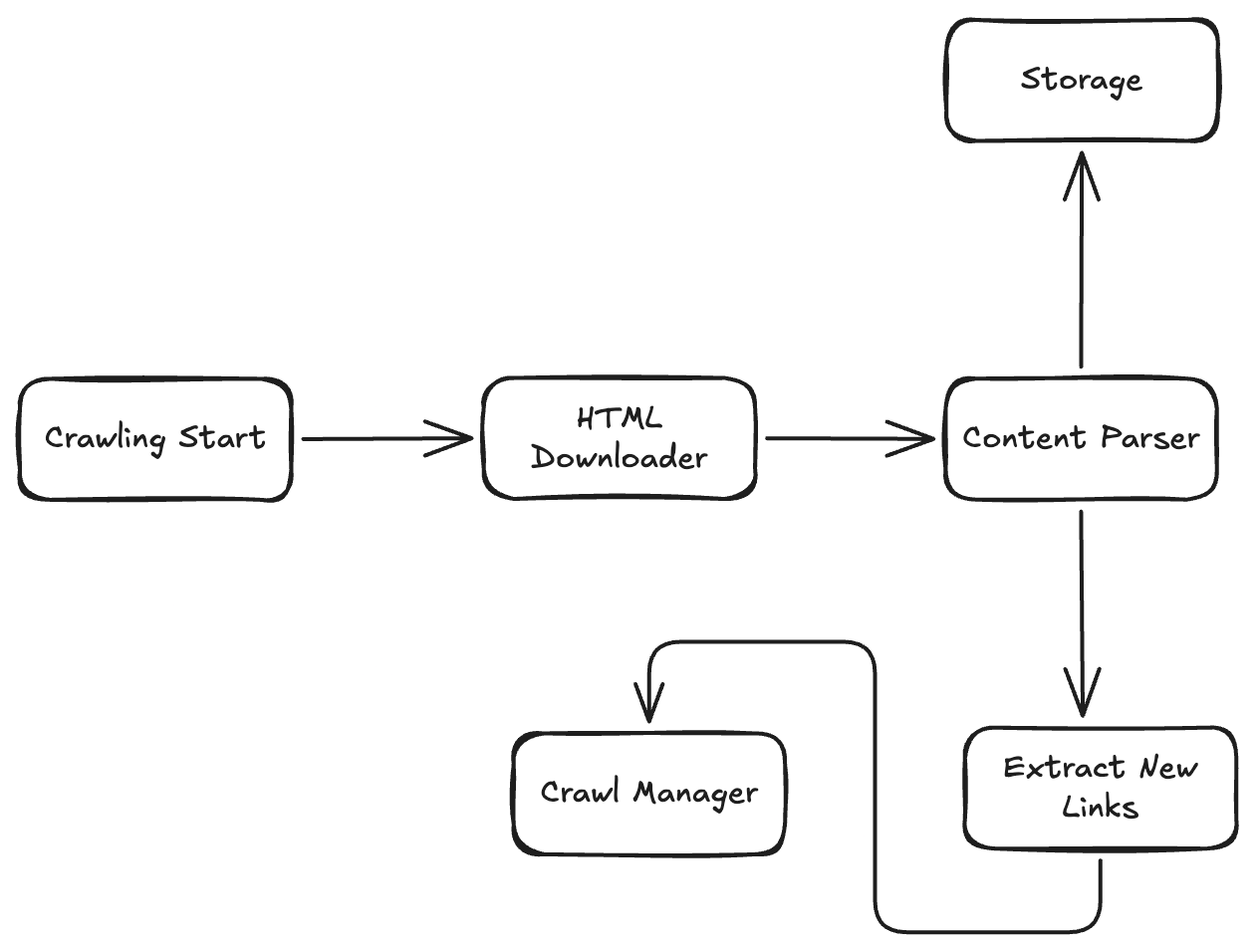
At this point, the URL has passed the initial checks and can be scheduled for fetching. The URL Frontier sends it to the downloader when the crawler is ready to fetch it.
HTML Downloader
As its name suggests, this component is responsible for downloading the resource at the URL. This is not a highly complicated component. For basic functionality, the downloader needs to make an HTTP GET request and process the response.
Content Parser
This is where magic happens. This component parses the downloaded HTML page and extracts meaningful information. This information includes:
- Title
- Meta Data
- Description & Text Content
- Other Links
But What Is HTML Parsing?
It is the process of analyzing raw HTML and converting it into a structured tree representation that a program can traverse.
How Does HTML Parsing Work?
Consider this simple HTML page:
 1<!DOCTYPE html>
 2<html lang="en">
 3<head>
 4    <meta charset="UTF-8">
 5    <meta name="viewport" content="width=device-width, initial-scale=1.0">
 6    <title>My Simple Web Page</title>
 7</head>
 8<body>
 9
10    <h1>Welcome to My Website</h1>
11    <p>This is a simple paragraph of text on your first web page.</p>
12
13    <h2>Things I Like</h2>
14    <ul>
15        <li>Coding</li>
16        <li>Learning new things</li>
17        <li>Web design</li>
18    </ul>
19
20    <a href="https://www.w3schools.com" target="_blank">Visit W3Schools for tutorials</a>
21
22</body>
23</html>
HTML can be represented as a tree where the html element is the root and head and body are child nodes. Those nodes can have their own children, so a parser can traverse the tree and extract the information it needs.
We do not have to implement HTML parsing from scratch for this project. In Go, for example, golang.org/x/net/html provides an HTML parser.
Duplicate Content Prevention
More advanced web crawlers also have this component that is responsible for checking if the content is duplicate. Different URLs can return the same or substantially similar content, so a crawler can use fingerprints or other techniques to avoid storing or processing duplicates repeatedly.
Content Storage
Now we have downloaded the HTML, parsed it into a usable data structure, and checked for duplicate content. The crawler can store the resulting data for later indexing and processing.
Can a Database Store Trillions of Objects?
At very large scale, this is typically a distributed storage problem rather than something handled by one database node. Large systems partition and replicate their data across many machines.
Which Database Is Used by These Giant Search Engines?
I don’t work in big tech, but I can answer this question based on data available publicly.
Public information has described different storage systems over time. Google has publicly discussed systems such as Google File System and Colossus, while Microsoft has described storage components used by Bing. These details evolve, so they should not be treated as a complete description of either search engine’s architecture.
New Links
While parsing a page, we can discover new URLs and add them back to the URL Frontier for future scheduling. This resembles a graph traversal, but a production crawler is usually more sophisticated than a simple breadth-first search. URL frontiers prioritize URLs using factors such as host policies, freshness, importance, and politeness.
- Crawl one page at the start.
- Get more links from that page.
- Schedule those links for crawling.
- When those links are crawled, new links are discovered.
- Repeat.
Doesn’t crawling billions of links take a lot of time?
The scale is enormous, so crawlers are distributed across many workers and continuously schedule work rather than processing the web as one sequential job. The single-link journey in this article is only a simplified mental model.
Large crawlers are distributed across many workers and machines so they can fetch many URLs concurrently while respecting per-host limits and other scheduling rules.