Let's Write a JSON Parser From Scratch
Hi,
It’s been a long time since I wrote something in this newsletter. Recently I was learning about language parsing and abstract syntax trees. After getting some knowledge about this, I decided to write a JSON parser from scratch.
Parsing
Parsing is the process of analyzing the structure of input according to a grammar. It helps us turn raw text into a structured representation that a program can work with. Writing a parser for a programming language is a very complex task because programming languages generally have a lot of keywords and syntax rules. Handling all those syntax and keywords can be overwhelming and highly difficult. But in the case of JSON we have a very limited number of keywords and syntax rules. So writing a JSON parser is a relatively easier task.
Tokenization
It is the process that is done before parsing. Tokenization means breaking a string of characters into smaller units called tokens and assigning each token a type. Below table will give you a solid idea of what tokens look like.
JSON:
1{
2  "name": "iPhone 6s",
3  "price": 649.99,
4  "isAvailable": true
5}
Result:
 1Token       : Type
 2------------:--------------
 3{           : BRACE_OPEN
 4name        : STRING
 5:           : COLON
 6iPhone 6s   : STRING
 7,           : COMMA
 8price       : STRING
 9:           : COLON
10649.99      : NUMBER
11,           : COMMA
12isAvailable : STRING
13:           : COLON
14true        : TRUE
15}           : BRACE_CLOSE
Once tokenization breaks the input into tokens, those tokens are passed to the parser, which builds the structured representation. We will discuss the parser and AST later in this post. For now, the first step is to create a tokenizer.
Writing the Tokenizer
Now let’s get into the code part where we tokenize a JSON string.
I wrote a function called Tokenize which takes a JSON string and returns a list of tokens. It loops through the string, character by character, and breaks it down into meaningful pieces like {, “key”, : or 123. These pieces are what we call tokens.
Here’s the full code, broken down step by step.
We will first start with creating some basic types for all the tokens.
 1const (
 2	TKN_BRACE_OPEN    = "BRACE_OPEN"
 3	TKN_BRACE_CLOSE   = "BRACE_CLOSE"
 4	TKN_STRING        = "STRING"
 5	TKN_NUMBER        = "NUMBER"
 6	TKN_COLON         = "COLON"
 7	TKN_COMMA         = "COMMA"
 8	TKN_TRUE          = "TRUE"
 9	TKN_FALSE         = "FALSE"
10	TKN_NULL          = "NULL"
11	TKN_BRACKET_OPEN  = "BRACKET_OPEN"
12	TKN_BRACKET_CLOSE = "BRACKET_CLOSE"
13)
14
15type Token struct {
16	Type  string
17	Value string
18}
We start with a current pointer to keep track of where we are in the string. stringLength helps us not go out of bounds, and tokens is the slice where we’ll collect all the tokens we generate.
 1func Tokenize(jsonString string) ([]Token, error) {
 2	current := 0
 3	stringLength := len(jsonString)
 4
 5	tokens := []Token{}
 6
 7	for current < stringLength {
 8		char := jsonString[current]
 9
10		if unicode.IsSpace(rune(char)) {
11			current++
12			continue
13		}
14
15		switch char {
16		case '{':
17			tokens = append(tokens, Token{Type: TKN_BRACE_OPEN, Value: "{"})
18			current++
19		case '}':
20			tokens = append(tokens, Token{Type: TKN_BRACE_CLOSE, Value: "}"})
21			current++
22		case '[':
23			tokens = append(tokens, Token{Type: TKN_BRACKET_OPEN, Value: "["})
24			current++
25		case ']':
26			tokens = append(tokens, Token{Type: TKN_BRACKET_CLOSE, Value: "]"})
27			current++
28		case ':':
29			tokens = append(tokens, Token{Type: TKN_COLON, Value: ":"})
30			current++
31		case ',':
32			tokens = append(tokens, Token{Type: TKN_COMMA, Value: ","})
33			current++
Skipping Whitespace
We loop through the entire string. If we hit whitespace, we skip it because whitespace doesn’t matter in JSON.
Switch Through Known Single-Character Tokens
Then we handle all the simple symbols here. These don’t need much logic — just push them to the tokens list and move on.
 1		case '"':
 2			current++
 3			start := current
 4
 5			for current < stringLength && jsonString[current] != '"' {
 6				if jsonString[current] == '\\' {
 7					current++
 8				}
 9				current++
10			}
11
12			str := jsonString[start:current]
13
14			if current >= stringLength {
15				return nil, fmt.Errorf("unterminated string: " + str)
16			}
17
18			tokens = append(tokens, Token{Type: TKN_STRING, Value: str})
19			current++
Handling Strings
When we encounter a “, we start reading a string. We look for the closing quote, while also making sure to skip escaped quotes like ". If the string is never closed, we throw an error. Otherwise, we extract the string and add it as a token.
 1		default:
 2			rest := jsonString[current:]
 3
 4			if strings.HasPrefix(rest, "true") {
 5				tokens = append(tokens, Token{Type: TKN_TRUE, Value: "true"})
 6				current += 4
 7			} else if strings.HasPrefix(rest, "false") {
 8				tokens = append(tokens, Token{Type: TKN_FALSE, Value: "false"})
 9				current += 5
10			} else if strings.HasPrefix(rest, "null") {
11				tokens = append(tokens, Token{Type: TKN_NULL, Value: "null"})
12				current += 4
Literals and Numbers
We check for true, false, and null first. If we see one of these keywords, we push it to the tokens list and jump ahead accordingly.
 1			} else if unicode.IsNumber(rune(char)) || char == '-' {
 2				start := current
 3				current++
 4
 5				hasDot := false
 6				hasExp := false
 7				expDigits := 0
 8
 9				for current < stringLength {
10					c := jsonString[current]
11
12					if c >= '0' && c <= '9' {
13						current++
14
15						if hasExp {
16							expDigits++
17						}
18					} else if c == '.' {
19						if hasDot || hasExp {
20							return nil, fmt.Errorf("invalid number: multiple dots or dot after exponent at position %d", current)
21						}
22
23						hasDot = true
24						current++
25					} else if c == 'e' || c == 'E' {
26						if hasExp {
27							return nil, fmt.Errorf("invalid number: multiple exponents at position %d", current)
28						}
29
30						hasExp = true
31						current++
32
33						if current < stringLength && (jsonString[current] == '+' || jsonString[current] == '-') {
34							current++
35						}
36
37						expDigits = 0
38					} else {
39						break
40					}
41				}
42
43				number := jsonString[start:current]
44
45				isValidJSONNumber := isValidNumber(number)
46				if !isValidJSONNumber {
47					return nil, fmt.Errorf("invalid JSON number: %s \n", number)
48				}
49
50				// Additional validation for bad exponent
51				if hasExp && expDigits == 0 {
52					return nil, fmt.Errorf("invalid number: exponent missing digits in '%s'", number)
53				}
54
55				if _, err := strconv.ParseFloat(number, 64); err != nil {
56					return nil, fmt.Errorf("invalid number: %s", number)
57				}
58
59				tokens = append(tokens, Token{Type: TKN_NUMBER, Value: number})
Numbers (Slightly Tricky)
JSON numbers can get complex. They might contain decimals, negative signs, and exponential notation (like 1.2e+10). We carefully walk through each character to build the number string. I also added validations to reject bad formats like 00, multiple dots, or missing exponent digits.
If Nothing Matches
If none of the above matched, the character is invalid in JSON — so we just throw an error.
1			} else {
2				return nil, fmt.Errorf("unexpected character: %c, position: %d", char, current)
3			}
4		}
5	}
6	return tokens, nil
7}
Number Validation Helper
This helper validates the JSON number grammar used by this tokenizer, including leading zeros, fractions, and exponents.
 1func isValidNumber(number string) bool {
 2	if number == "" {
 3		return false
 4	}
 5
 6	i := 0
 7	if number[i] == '-' {
 8		i++
 9		if i == len(number) {
10			return false
11		}
12	}
13
14	// Integer part: either 0 or a non-zero digit followed by digits.
15	if number[i] == '0' {
16		i++
17		if i < len(number) && number[i] >= '0' && number[i] <= '9' {
18			return false // leading zero
19		}
20	} else if number[i] >= '1' && number[i] <= '9' {
21		for i < len(number) && number[i] >= '0' && number[i] <= '9' {
22			i++
23		}
24	} else {
25		return false
26	}
27
28	// Fractional part must contain at least one digit after the dot.
29	if i < len(number) && number[i] == '.' {
30		i++
31		start := i
32		for i < len(number) && number[i] >= '0' && number[i] <= '9' {
33			i++
34		}
35		if i == start {
36			return false
37		}
38	}
39
40	// Exponent must contain at least one digit, with an optional sign.
41	if i < len(number) && (number[i] == 'e' || number[i] == 'E') {
42		i++
43		if i < len(number) && (number[i] == '+' || number[i] == '-') {
44			i++
45		}
46		start := i
47		for i < len(number) && number[i] >= '0' && number[i] <= '9' {
48			i++
49		}
50		if i == start {
51			return false
52		}
53	}
54
55	return i == len(number)
56}
Printer
This just prints the list of tokens in a nice readable format. Super handy when testing your tokenizer.
1func printTokens(tokens []Token) {
2	fmt.Printf("%-14s | %s\n", "Type", "Value")
3	fmt.Println(strings.Repeat("-", 50))
4
5	for _, token := range tokens {
6		fmt.Printf("%-14s | %s\n", token.Type, token.Value)
7	}
8}
Tokenization Output
If we give the following JSON to our tokenizer, we get the following output.
1{
2  "name": "iPhone 6s",
3  "price": 649.99,
4  "isAvailable": true
5}
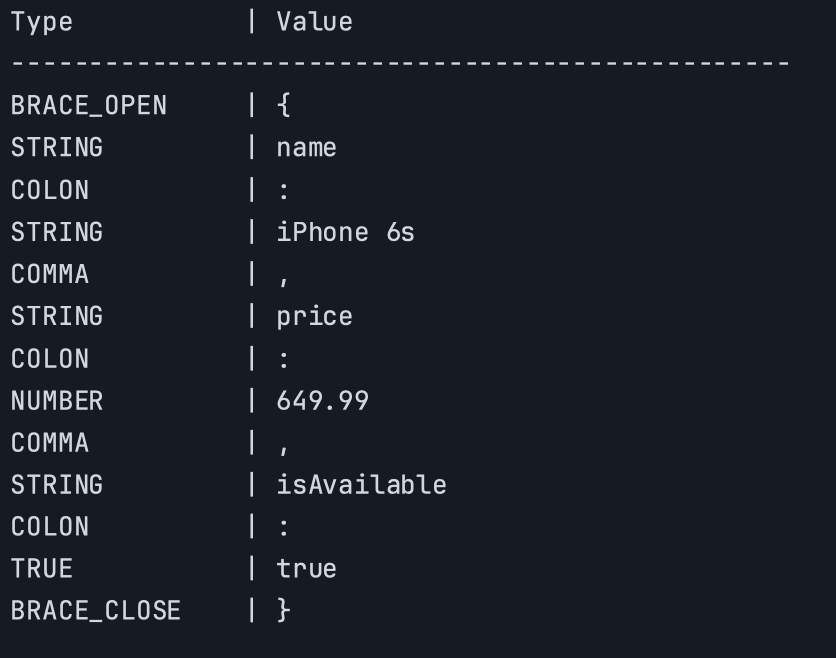
Now our JSON is tokenized, and each meaningful part of the input has an appropriate token type.
Parsing & AST
We have now created a tokenizer that converts JSON objects to tokens. The next step is to create a parser that can convert these tokens into an abstract syntax tree. But first, let’s understand what an abstract syntax tree is.
Abstract Syntax Tree (AST)
An abstract syntax tree (AST) is a tree structure that represents the syntactic structure of an input. In this JSON parser, the tree represents JSON values such as objects, arrays, strings, numbers, booleans, and null.
Writing the Parser
 1
 2type ASTNode interface {
 3	Type() string
 4}
 5
 6type ObjectNode struct {
 7	Value map[string]ASTNode
 8}
 9
10func (o ObjectNode) Type() string {
11	return "Object"
12}
13
14type ArrayNode struct {
15	Value []ASTNode
16}
17
18func (a ArrayNode) Type() string {
19	return "Array"
20}
21
22type StringNode struct {
23	Value string
24}
25
26func (s StringNode) Type() string {
27	return "String"
28}
29
30type NumberNode struct {
31	Value float64
32}
33
34func (n NumberNode) Type() string {
35	return "Number"
36}
37
38type BooleanNode struct {
39	Value bool
40}
41
42func (b BooleanNode) Type() string {
43	return "Boolean"
44}
45
46type NullNode struct{}
47
48func (n NullNode) Type() string {
49	return "Null"
50}
This is the base interface for all AST node types. Every node will implement the Type() method, which is a simple way to identify what kind of data (Object, Array, String, etc.) it holds.
1func Parser(tokens []Token) (ASTNode, error) {
2 if len(tokens) == 0 {
3 return nil, errors.New("nothing to parse")
4 }
5
6 current := 0
7 node, err := parseValue(¤t, tokens)
8 if err != nil {
9 return nil, err
10 }
11
12 if current != len(tokens) {
13 return nil, fmt.Errorf("unexpected token at position %d", current)
14 }
15
16 return node, nil
17}
- This is the main function you call to parse the token stream.
- It checks if there’s anything to parse. Then it initializes a current pointer (used as an index into the tokens slice).
- Delegates to parseValue, which handles all the different types.
 1func parseValue(current *int, tokens []Token) (ASTNode, error) {
 2	if *current >= len(tokens) {
 3		return nil, fmt.Errorf("unexpected end of input")
 4	}
 5
 6	token := tokens[*current]
 7
 8	switch token.Type {
 9	case TKN_STRING:
10		*current++
11		return StringNode{Value: token.Value}, nil
12
13	case TKN_NUMBER:
14		num, _ := strconv.ParseFloat(token.Value, 64)
15		*current++
16		return NumberNode{Value: num}, nil
17
18	case TKN_TRUE:
19		*current++
20		return BooleanNode{Value: true}, nil
21
22	case TKN_FALSE:
23		*current++
24		return BooleanNode{Value: false}, nil
25
26	case TKN_NULL:
27		*current++
28		return NullNode{}, nil
29
30	case TKN_BRACE_OPEN:
31		return parseObject(current, tokens)
32
33	case TKN_BRACKET_OPEN:
34		return parseArray(current, tokens)
35
36	default:
37		return nil, fmt.Errorf("invalid token type: %s", token.Type)
38	}
39}
Basic safety check: if the current token is past the end, return an error.
Parsing Values
- String token → wrap it in StringNode.
- Number → parse into
float64. - Booleans and null are direct mappings.
Using float64 is a deliberate simplification for this project. Very large JSON integers cannot always be represented exactly by float64, so a production parser that needs exact numeric preservation would use a different representation.
- Delegates to specialize functions for objects ({}) and arrays ([]).
- Anything unexpected = throw an error.
 1func parseObject(current *int, tokens []Token) (ASTNode, error) {
 2	node := ObjectNode{
 3		Value: make(map[string]ASTNode),
 4	}
 5
 6	*current++
 7
 8	for *current < len(tokens) && tokens[*current].Type != TKN_BRACE_CLOSE {
 9		currToken := tokens[*current]
10
11		if currToken.Type != TKN_STRING {
12			return nil, fmt.Errorf("expected string key in object, got: %s", currToken.Type)
13		}
14
15		key := currToken.Value
16		*current++
17
18		if *current >= len(tokens) || tokens[*current].Type != TKN_COLON {
19			return nil, fmt.Errorf("expected : in key value pair, got: %s", currToken.Type)
20		}
21
22		*current++
23
24		value, err := parseValue(current, tokens)
25		if err != nil {
26			return nil, err
27		}
28
29		node.Value[key] = value
30
31		if *current < len(tokens) && tokens[*current].Type == TKN_COMMA {
32			*current++
33		}
34	}
35
36	if *current >= len(tokens) || tokens[*current].Type != TKN_BRACE_CLOSE {
37		return nil, fmt.Errorf("expected closing brace, got: %s", tokens[*current].Type)
38	}
39
40	*current++
41
42	return node, nil
43}
- Skip the { token.
- Initialize an ObjectNode.
- Extract the key from the object and parse the value using the already written parseValue() function.
 1func parseArray(current *int, tokens []Token) (ASTNode, error) {
 2	node := ArrayNode{
 3		Value: make([]ASTNode, 0),
 4	}
 5
 6	*current++
 7
 8	for *current < len(tokens) && tokens[*current].Type != TKN_BRACKET_CLOSE {
 9
10		val, err := parseValue(current, tokens)
11		if err != nil {
12			return nil, err
13		}
14
15		node.Value = append(node.Value, val)
16
17		if *current < len(tokens) && tokens[*current].Type == TKN_COMMA {
18			*current++
19		}
20	}
21
22	if *current >= len(tokens) || tokens[*current].Type != TKN_BRACKET_CLOSE {
23		return nil, fmt.Errorf("expected closing bracket, got: %s", tokens[*current].Type)
24	}
25
26	*current++
27
28	return node, nil
29}
- Start parsing array (skip the [ token).
- Loop through all values.
- Each value is parsed with parseValue and append value to initialized array.
- Ensure the array ends correctly with ].
Output
This parser is intentionally a learning project rather than a complete production JSON implementation. In particular, a production parser should handle every JSON escape and Unicode rule, reject malformed input rigorously, define its duplicate-key behavior, and choose a numeric representation appropriate for its precision requirements.
Below is the output we will get if we parse the tokens of JSON that we used above.
1{
2    map[isAvailable:{true}
3    name:{iPhone 6s}
4    price:{649.99}]
5}
Final Thoughts
So this was how we could implement a simple JSON tokenizer and parser from scratch. If you have any suggestions or doubts, you can always comment below. Consider subscribing to my newsletter to get notified for new posts.